 Alex Ryltsov
ccc7f7429b
Alex Ryltsov
ccc7f7429b
Implemented the fix to return the appropriate error message for the use case when the user selects one or more images which needs to be downloaded from iCloud and there is no connectivity (to download them).
MediaPicker v:2.4.3
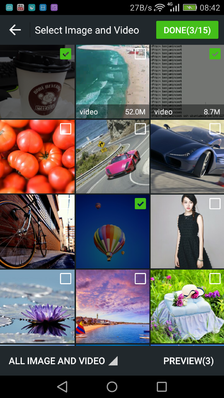
android ios mediaPicker support selection of multiple image and video gif (Support Chinese, English, Spanish, Portuguese, and Turkish)
android 和 ios cordova图片视频选择插件,支持多图 视频 gif,ui类似微信。 联系QQ:3451927565
GitHub: https://github.com/DmcSDK/cordova-plugin-mediaPicker
怎么用?How do I use?
use npm OR github:
cordova plugin add https://github.com/DmcSDK/cordova-plugin-mediaPicker.git --variable IOS_PHOTO_LIBRARY_USAGE_DESCRIPTION="your usage message"
Example
html code:
<body>
    <div>
        <img name="imgView"  height="100px" >
        <img name="imgView"  height="100px" >
    </div>
    <button id="openBtn">open</button>
    <button id="uploadBtn">upload</button>
    <button id="takePhotoBtn">takePhoto</button>
    <script type="text/javascript" src="cordova.js"></script>
    <script type="text/javascript" src="js/index.js"></script>
</body>
demo.js simple code:
var resultMedias=[];
var imgs = document.getElementsByName('imgView');
var args = {
    'selectMode': 101, //101=picker image and video , 100=image , 102=video
    'maxSelectCount': 40, //default 40 (Optional)
    'maxSelectSize': 188743680, //188743680=180M (Optional)
};

document.getElementById('openBtn').onclick = function() {
    MediaPicker.getMedias(args, function(medias) {
        //medias [{mediaType: "image", path:'/storage/emulated/0/DCIM/Camera/2017.jpg', uri:"android retrun uri,ios retrun URL" size: 21993}]
        resultMedias = medias;
        getThumbnail(medias);
    }, function(e) { console.log(e) })
};

function getThumbnail(medias) {
    for (var i = 0; i < medias.length; i++) {
        //medias[i].thumbnailQuality=50; (Optional)
        //loadingUI(); //show loading ui
        MediaPicker.extractThumbnail(medias[i], function(data) {
            imgs[data.index].src = 'data:image/jpeg;base64,' + data.thumbnailBase64;
            imgs[data.index].setAttribute('style', 'transform:rotate(' + data.exifRotate + 'deg)');
        }, function(e) { console.log(e) });
    }
}

function loadingUI() {}
upload and compress 上传 和 压缩
demo.js upload and compress code:
document.getElementById('uploadBtn').onclick = function() {
    //1.please:  cordova plugin add cordova-plugin-file-transfer
    //2.see:  https://github.com/apache/cordova-plugin-file-transfer

    //3.use medias[index].path //upload original img
    //OR
    //3.compressImage(); //upload compress img
};

function compressImage() {
    for (var i = 0; i < resultMedias.length; i++) {
        // if(resultMedias[i].size>1048576){ resultMedias[i].quality=50; } else {d ataArray[i].quality=100;}
        resultMedias[i].quality = 30; //when the value is 100,return original image
        MediaPicker.compressImage(resultMedias[i], function(compressData) {
            //user compressData.path upload compress img
            console.log(compressData.path);
        }, function(e) { console.log(e) });
    }
}

//ios Video transcoding compression to MP4 Event(use AVAssetExportPresetMediumQuality)
document.addEventListener("MediaPicker.CompressVideoEvent", function(data) {
    alert(data.status + "||" + data.index);
}, false);
takePhoto 拍照
demo.js takePhoto code:
please add : cordova plugin add cordova-plugin-camera
cameraOptions docs: https://cordova.apache.org/docs/en/latest/reference/cordova-plugin-camera/index.html#camera
//please add : cordova plugin add cordova-plugin-camera
document.getElementById('takePhotoBtn').onclick = function() {
    var cameraOptions={ quality: 50,mediaType: Camera.MediaType.PICTURE };//see cordova camera docs
    MediaPicker.takePhoto(cameraOptions,function(media) {
            media.index=0;//index use to imgs[data.index].src; // media.index=resultMedias.length;
            resultMedias.push(media);
            getThumbnail(resultMedias);
      }, function(e) { console.log(e) });
};
More api 其他API
API https://github.com/DmcSDK/cordova-plugin-mediaPicker/blob/master/www/MediaPicker.js
My android source code GitHub: https://github.com/DmcSDK/MediaPickerPoject
My IOS source code GitHub: https://github.com/DmcSDK/IOSMediaPicker
Screenshots
| Android | iOS |
|---|---|
 |
 |